About

Blogger Tips and TricksLatest Tips For BloggersBlogger Tricks

Blogger Tips and TricksLatest Tips For BloggersBlogger Tricks
Showing posts with label METASPLOIT. Show all posts

Thursday, 29 June 2017

TheFatRat v1.9: Create backdoor & bypass AV

Thefatrat

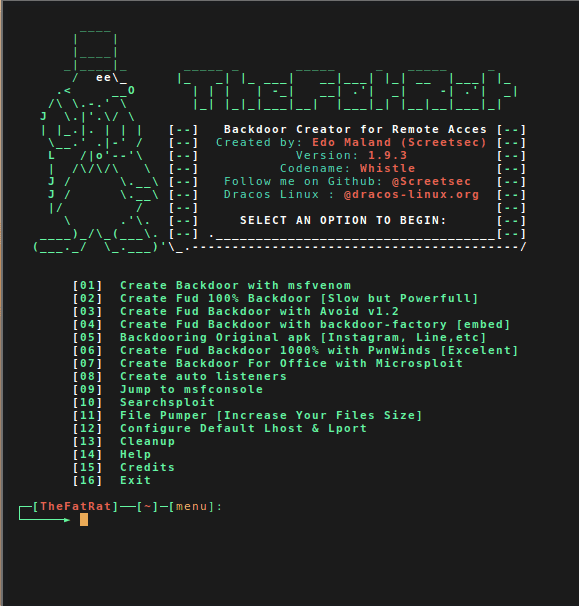
An easy tool to generate backdoor and easy tool to post exploitation attack like browser attack,dll . This tool compiles a malware with popular payload and then the compiled malware can be execute on windows, android, mac . The malware that created with this tool also have an ability to bypass most AV software protection.

Automating metasploit functions

  • Create backdoor for windows , linux , mac and android
  • bypass antivirus backdoorr
  • Checks for metasploit service and starts if not present
  • Easily craft meterpreter reverse_tcp payloads for Windows, Linux, Android and Mac and another
  • Start multiple meterpreter reverse_tcp listners
  • Fast Search in searchsploit
  • Bypass AV
  • File pumper
  • Create backdoor with another techniq
  • Autorunscript for listeners ( easy to use )
  • Drop into Msfconsole
  • Some other fun stuff

Change log v1.9

  • v1.9.4 – Fatrat will be full terminal mode , Powerstage tool added , Setup script rebuilded
  • v1.9.3 – Added update script
  • v1.9.3 – Dex2Jar will be installed from now on from Fatrat setup manually on user system (reason: Kali repo still uses old version)
  • v1.9.3 – Updated Android build tools to V.26 RC1 & Android Platform V. 25-R03
  • v1.9.3 – Updated dana travis backdoor-apk to 0.2.2 into fatrat / added openssl in setup
  • v1.9.2 – Msfvenom Android rat will be signed with android certificate , so it can be installed properly
  • v1.9.2 – Implemented Default Lhost & Lport config to fatrat & powerfull shell creator
  • v1.9.2 – Fixed payload in pnwinds option2
  • v1.9.2 – Implemented Stop functions in pnwinds
  • v1.9.2 – New signing process in old method backdoor apk & option to create listener
  • v1.9.2 – Implemented possibility for user to save msfconsole listeners
  • v1.9.2 – Fixes in Microsploit
  • v1.9.2 – Implemented local ip , public ip & hostname display to powerfull.sh
  • v1.9.2 – Implemented local ip , public ip & hostname display before user set Lhost
  • v1.9.2 – Implemented log creation for microsploit & fixed bugs
  • v1.9.2 – Added effective way to detect user linux distribution
  • v1.9.2 – Setup.sh ( patched )
  • v1.9.2 – bug in microsploit ( patched )
  • v1.9.2 – delt some function and variable
  • v1.9.1 – v1.9.1 – Implemented Microsploit (Office Exploitation Tool)
  • v1.9b – Implemented Backdoor-apk from Dana James Traversie in this version .{ Less tools to install during setup.sh }
  • v1.9.0 – update script setup.sh
  • v1.9.0 – del some variable and function
  • v1.9.0 – fixed typo and bugs
  • v1.9.0 – Backdoor APKS have a new payload hiding method in rat apk to not be detected .
  • v1.9.0 – APK (5) rat rebuild totally changed .(adapted backdoor-apk script to fatrat to both work together)
  • v1.9.0 – Apktool will not be installed no more by setup.sh , the same thing applies to : dx , zipalign (apktool on debian repo is 2.2.1 , and that version have a bug that gives error on compiling the apks , so , apktool and android tools were updated to latest version 25.0.2 and embeded in (tools) directory of fatrat .

Download & Installation
git clone https://github.com/Screetsec/TheFatRat.git
cd TheFatRat
chmod +x setup.sh && ./setup.sh
Source: Github

Monday, 26 June 2017

[BlackHat Tool] apt2: automated penetration toolkit

APT2 – An Automated Penetration Testing Toolkit

This tool will perform an NMap scan, or import the results of a scan from Nexpose, Nessus, or NMap. The processesd results will be used to launch exploit and enumeration modules according to the configurable Safe Level and enumerated service information.
All module results are stored on localhost and are part of APT2’s Knowledge Base (KB). The KB is accessible from within the application and allows the user to view the harvested results of an exploit module.

Change log v1.0-20170613

+ Added packaging and fix apt2_whois
+ fixed issues with misc data files and installing packages.
+ module: temp fix till I get time to do a better one.

Setup

NOTE: APT2 is currently only tested on Linux based OSes. If you can confirm that it works on other OSes, please let us know.
On Kali Linux install python-nmap library:
  • pip install python-nmap
  • pip install pysmb
  • pip install yattag
  • pip install scapy
  • pip install ftputil
  • pip install msgpack-python

Current External Program/Script Dependencies

To make full use of all of APT2’s modules, the following external dependencies should be install on your system:
convert, dirb, hydra, java, john, ldapsearch, msfconsole, nmap, nmblookup, phantomjs, responder, rpcclient, secretsdump.py, smbclient, snmpwalk, sslscan, xwd

Configuration (Optional)

APT2 uses the default.cfg file in the root directory. Edit this file to configure APT2 to run as you desire.
Current options include:
  • metasploit
  • nmap
  • threading
Metasploit RPC API (metasploit)
APT2 can utuilize your host’s Metasploit RPC interface (MSGRPC). Additional Information can be found here: https://help.rapid7.com/metasploit/Content/api-rpc/getting-started-api.html
NMAP
Configure NMAP scan settings to include the target, scan type, scan port range, and scan flags. These settings can be configured while the program is running.
Threading
Configure the number of the threads APT2 will use.

Run:

No Options:

python apt2 or ./apt2

With Configuration File

python apt2 -C <config.txt>

Import Nexpose, Nessus, or NMap XML

python apt2 -f <nmap.xml>

Specify Target Range to Start

python apt2 -f 192.168.1.0/24

Safe Level

Safe levels indicate how safe a module is to run againsts a target. The scale runs from 1 to 5 with 5 being the safest. The default configuration uses a Safe Level of 4 but can be set with the -s or --safelevel command line flags.

Usage:

usage: apt2.py [-h] [-C <config.txt>] [-f [<input file> [<input file> ...]]]
[--target] [--ip <local IP>] [-v] [-s SAFE_LEVEL] [-b]
[--listmodules]
optional arguments:
-h, --help            show this help message and exit
-v, --verbosity       increase output verbosity
-s SAFE_LEVEL, --safelevel SAFE_LEVEL
set min safe level for modules
-b, --bypassmenu      bypass menu and run from command line arguments
inputs:
-C <config.txt>       config file
-f [<input file> [<input file> ...]]
one of more input files seperated by spaces
--target              initial scan target(s)
ADVANCED:
--ip <local IP>       defaults to ip of interface
misc:
--listmodules         list out all current modules

Modules

-----------------------
LIST OF CURRENT MODULES
-----------------------
nmaploadxml               Load NMap XML File
hydrasmbpassword          Attempt to bruteforce SMB passwords
nullsessionrpcclient      Test for NULL Session
msf_snmpenumshares        Enumerate SMB Shares via LanManager OID Values
nmapbasescan              Standard NMap Scan
impacketsecretsdump       Test for NULL Session
msf_dumphashes            Gather hashes from MSF Sessions
msf_smbuserenum           Get List of Users From SMB
anonftp                   Test for Anonymous FTP
searchnfsshare            Search files on NFS Shares
crackPasswordHashJohnTR   Attempt to crack any password hashes
msf_vncnoneauth           Detect VNC Services with the None authentication type
nmapsslscan               NMap SSL Scan
nmapsmbsigning            NMap SMB-Signing Scan
responder                 Run Responder and watch for hashes
msf_openx11               Attempt Login To Open X11 Service
nmapvncbrute              NMap VNC Brute Scan
msf_gathersessioninfo     Get Info about any new sessions
nmapsmbshares             NMap SMB Share Scan
userenumrpcclient         Get List of Users From SMB
httpscreenshot            Get Screen Shot of Web Pages
httpserverversion         Get HTTP Server Version
nullsessionsmbclient      Test for NULL Session
openx11                   Attempt Login To Open X11 Servicei and Get Screenshot
msf_snmplogin             Attempt Login Using Common Community Strings
msf_snmpenumusers         Enumerate Local User Accounts Using LanManager/psProcessUsername OID Values
httpoptions               Get HTTP Options
nmapnfsshares             NMap NFS Share Scan
msf_javarmi               Attempt to Exploit A Java RMI Service
anonldap                  Test for Anonymous LDAP Searches
ssltestsslserver          Determine SSL protocols and ciphers
gethostname               Determine the hostname for each IP
sslsslscan                Determine SSL protocols and ciphers
nmapms08067scan           NMap MS08-067 Scan
msf_ms08_067              Attempt to exploit MS08-067