About

Blogger Tips and TricksLatest Tips For BloggersBlogger Tricks

Blogger Tips and TricksLatest Tips For BloggersBlogger Tricks
Showing posts with label ETHICAL HACKING. Show all posts

Friday, 7 July 2017

Ethical Hacking - ARP Poisoning

Address Resolution Protocol (ARP) is a stateless protocol used for resolving IP addresses to machine MAC addresses. All network devices that need to communicate on the network broadcast ARP queries in the system to find out other machines’ MAC addresses. ARP Poisoning is also known as ARP Spoofing.
Here is how ARP works −
  • When one machine needs to communicate with another, it looks up its ARP table.
  • If the MAC address is not found in the table, the ARP_request is broadcasted over the network.
  • All machines on the network will compare this IP address to MAC address.
  • If one of the machines in the network identifies this address, then it will respond to the ARP_request with its IP and MAC address.
  • The requesting computer will store the address pair in its ARP table and communication will take place.

What is ARP Spoofing?

ARP packets can be forged to send data to the attacker’s machine.
  • ARP spoofing constructs a large number of forged ARP request and reply packets to overload the switch.
  • The switch is set in forwarding mode and after the ARP table is flooded with spoofed ARP responses, the attackers can sniff all network packets.
Attackers flood a target computer ARP cache with forged entries, which is also known as poisoning. ARP poisoning uses Man-in-the-Middle access to poison the network.

What is MITM?

The Man-in-the-Middle attack (abbreviated MITM, MitM, MIM, MiM, MITMA) implies an active attack where the adversary impersonates the user by creating a connection between the victims and sends messages between them. In this case, the victims think that they are communicating with each other, but in reality, the malicious actor controls the communication.
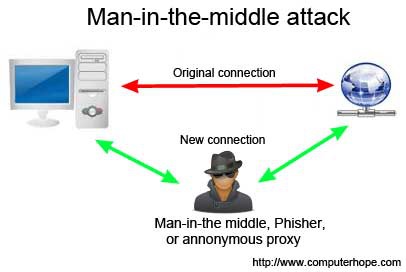
Third Person
A third person exists to control and monitor the traffic of communication between two parties. Some protocols such as SSL serve to prevent this type of attack.

ARP Poisoning − Exercise

In this exercise, we have used BetterCAP to perform ARP poisoning in LAN environment using VMware workstation in which we have installed Kali Linux and Ettercap tool to sniff the local traffic in LAN.
For this exercise, you would need the following tools −
  • VMware workstation
  • Kali Linux or Linux Operating system
  • Ettercap Tool
  • LAN connection
Note − This attack is possible in wired and wireless networks. You can perform this attack in local LAN.
Step 1 − Install the VMware workstation and install the Kali Linux operating system.
Step 2 − Login into the Kali Linux using username pass “root, toor”.
Step 3 − Make sure you are connected to local LAN and check the IP address by typing the command ifconfig in the terminal.
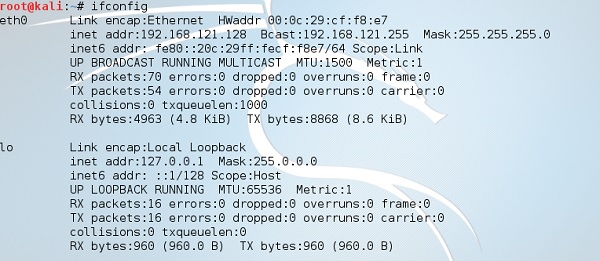
Ifconfig
Step 4 − Open up the terminal and type “Ettercap –G” to start the graphical version of Ettercap.
Ettercap
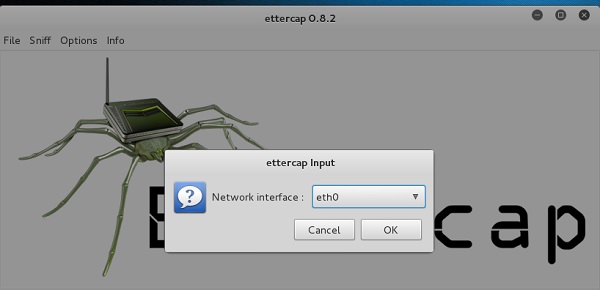
Step 5 − Now click the tab “sniff” in the menu bar and select “unified sniffing” and click OK to select the interface. We are going to use “eth0” which means Ethernet connection.
Ettercap Input
Step 6 − Now click the “hosts” tab in the menu bar and click “scan for hosts”. It will start scanning the whole network for the alive hosts.
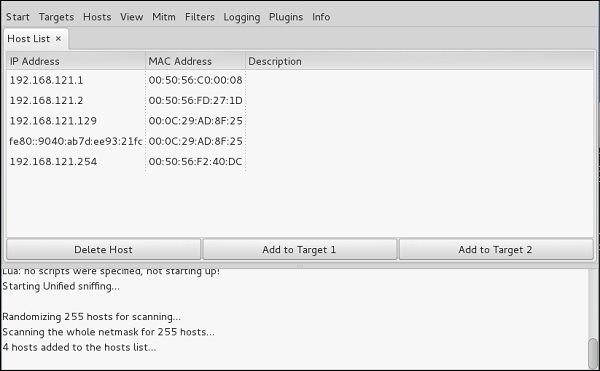
Step 7 − Next, click the “hosts” tab and select “hosts list” to see the number of hosts available in the network. This list also includes the default gateway address. We have to be careful when we select the targets.
Host Tab
Step 8 − Now we have to choose the targets. In MITM, our target is the host machine, and the route will be the router address to forward the traffic. In an MITM attack, the attacker intercepts the network and sniffs the packets. So, we will add the victim as “target 1” and the router address as “target 2.”
In VMware environment, the default gateway will always end with “2” because “1” is assigned to the physical machine.
Step 9 − In this scenario, our target is “192.168.121.129” and the router is “192.168.121.2”. So we will add target 1 as victim IP and target 2 as router IP.

Target
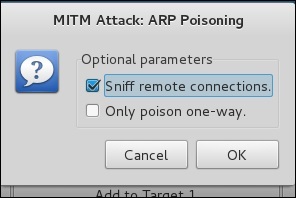
Step 10 − Now click on “MITM” and click “ARP poisoning”. Thereafter, check the option “Sniff remote connections” and click OK.
Mitm Attack
Step 11 − Click “start” and select “start sniffing”. This will start ARP poisoning in the network which means we have enabled our network card in “promiscuous mode” and now the local traffic can be sniffed.
Note − We have allowed only HTTP sniffing with Ettercap, so don’t expect HTTPS packets to be sniffed with this process.
Step 12 − Now it’s time to see the results; if our victim logged into some websites. You can see the results in the toolbar of Ettercap.

Result
This is how sniffing works. You must have understood how easy it is to get the HTTP credentials just by enabling ARP poisoning.
ARP Poisoning has the potential to cause huge losses in company environments. This is the place where ethical hackers are appointed to secure the networks.
Like ARP poisoning, there are other attacks such as MAC flooding, MAC spoofing, DNS poisoning, ICMP poisoning, etc. that can cause significant loss to a network.
In the next chapter, we will discuss another type of attack known as DNS poisoning.

Ethical Hacking - Cross-Site Scripting

Cross-site scripting (XSS) is a code injection attack that allows an attacker to execute malicious JavaScript in another user's browser.
The attacker does not directly target his victim. Instead, he exploits a vulnerability in a website that the victim visits, in order to get the website to deliver the malicious JavaScript for him. To the victim's browser, the malicious JavaScript appears to be a legitimate part of the website, and the website has thus acted as an unintentional accomplice to the attacker. These attacks can be carried out using HTML, JavaScript, VBScript, ActiveX, Flash, but the most used XSS is malicious JavaScript.
These attacks also can gather data from account hijacking, changing of user settings, cookie theft/poisoning, or false advertising and create DoS attacks.

Example

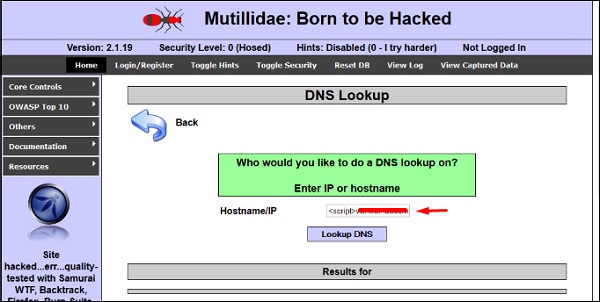
Let’s take an example to understand how it works. We have a vulnerable webpage that we got by the metasploitablemachine. Now we will test the field that is highlighted in red arrow for XSS.
Metasploitable
First of all, we make a simple alert script
<script>  
   alert(‘I am Vulnerable’)  
</script>
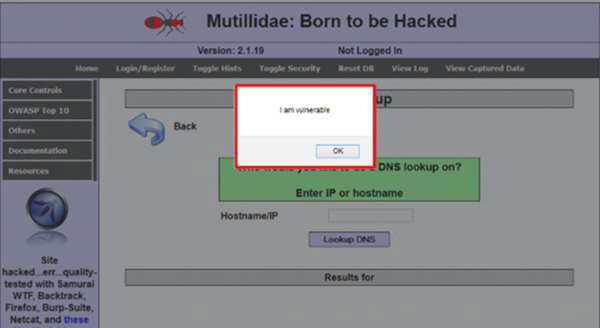
It will produce the following output −
Simple Alert

Types of XSS Attacks

XSS attacks are often divided into three types −
  • Persistent XSS, where the malicious string originates from the website's database.
  • Reflected XSS, where the malicious string originates from the victim's request.
  • DOM-based XSS, where the vulnerability is in the client-side code rather than the server-side code.
Generally, cross-site scripting is found by vulnerability scanners so that you don’t have to do all the manual job by putting a JavaScript on it like
<script>  
   alert('XSS') 
</script>
Burp Suite and acunetix are considered as the best vulnerability scanners.

Quick Tip

To prevent XSS attacks, keep the following points in mind −
  • Check and validate all the form fields like hidden forms, headers, cookies, query strings.
  • Implement a stringent security policy. Set character limitation in the input fields.

Ethical Hacking - SQL Injection

SQL injection is a set of SQL commands that are placed in a URL string or in data structures in order to retrieve a response that we want from the databases that are connected with the web applications. This type of attacks generally takes place on webpages developed using PHP or ASP.NET.
An SQL injection attack can be done with the following intentions −
  • To dump the whole database of a system,
  • To modify the content of the databases, or
  • To perform different queries that are not allowed by the application.
This type of attack works when the applications don’t validate the inputs properly, before passing them to an SQL statement. Injections are normally placed put in address bars, search fields, or data fields.
The easiest way to detect if a web application is vulnerable to an SQL injection attack is to use the " ‘ " character in a string and see if you get any error.

Example 1

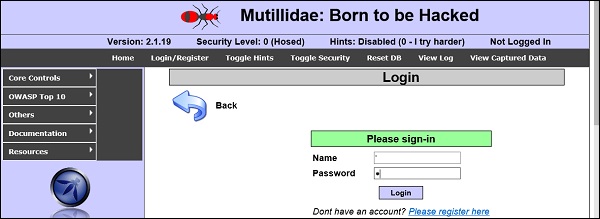
Let’s try to understand this concept using a few examples. As shown in the following screenshot, we have used a " ‘ " character in the Name field.
Name Field
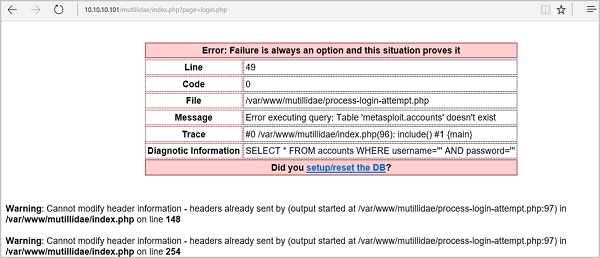
Now, click the Login button. It should produce the following response −
Login
It means that the “Name” field is vulnerable to SQL injection.

Example 2

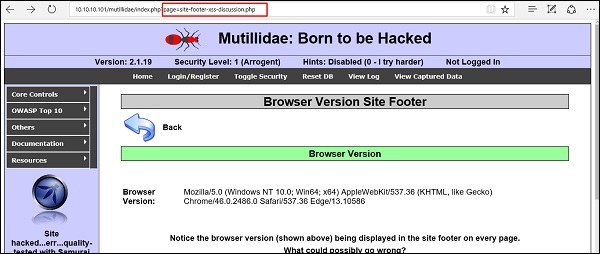
We have this URL − http://10.10.10.101/mutillidae/index.php?page=site-footer-xssdiscussion.php
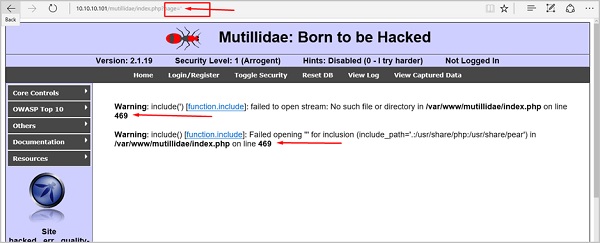
And we want to test the variable “page” but observe how we have injected a " ‘ " character in the string URL.
Variable Page
When we press Enter, it will produce the following result which is with errors.
Result With Errors

SQLMAP

SQLMAP is one of the best tools available to detect SQL injections. It can be downloaded from http://sqlmap.org/
It comes pre-compiled in the Kali distribution. You can locate it at − Applications → Database Assessment → Sqlmap.
After opening SQLMAP, we go to the page that we have the SQL injection and then get the header request. From the header, we run the following command in SQL −
./sqlmap.py --headers="User-Agent: Mozilla/5.0 (X11; Ubuntu; Linux i686; rv:25.0) 
Gecko/20100101 Firefox/25.0" --cookie="security=low;
PHPSESSID=oikbs8qcic2omf5gnd09kihsm7" -u '
http://localhost/dvwa/vulnerabilities/sqli_blind/?id=1&Submit=Submit#' -
level=5 risk=3 -p id --suffix="-BR" -v3
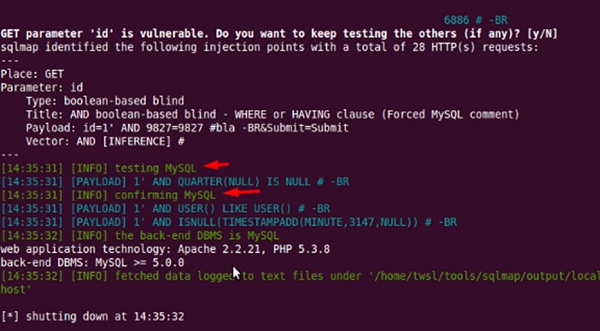
The SQLMAP will test all the variables and the result will show that the parameter “id” is vulnerable, as shown in the following screenshot.
SQL Map

SQLNinja

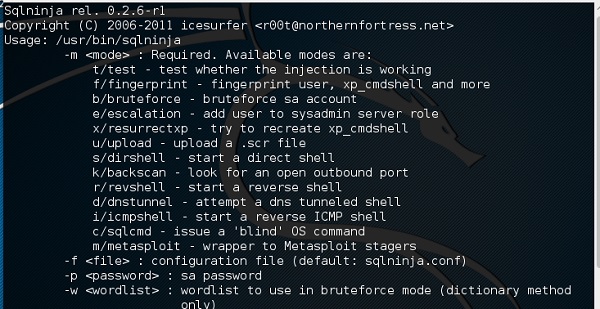
SQLNinja is another SQL injection tool that is available in Kali distribution.
SQLninja

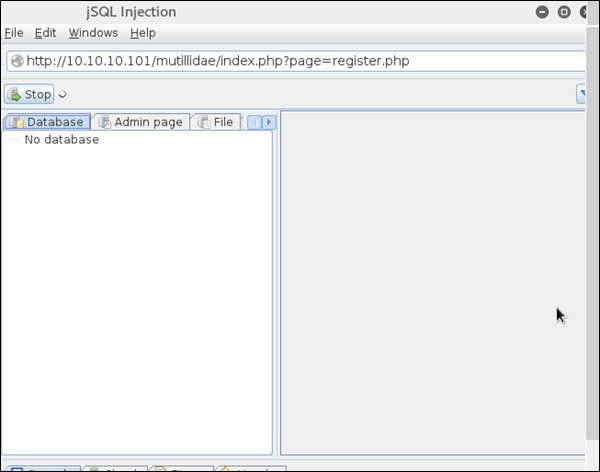
JSQL Injection

JSQL Injection is in Java and it makes automated SQL injections.
JSQL Injection

Quick Tips

To prevent your web application from SQL injection attacks, you should keep the following points in mind −
  • Unchecked user-input to database should not be allowed to pass through the application GUI.
  • Every variable that passes into the application should be sanitized and validated.
  • The user input which is passed into the database should be quoted.

Ethical Hacking - Pen Testing

Penetration Testing is a method that many companies follow in order to minimize their security breaches. This is a controlled way of hiring a professional who will try to hack your system and show you the loopholes that you should fix.
Before doing a penetration test, it is mandatory to have an agreement that will explicitly mention the following parameters −
  • what will be the time of penetration test,
  • where will be the IP source of the attack, and
  • what will be the penetration fields of the system.
Penetration testing is conducted by professional ethical hackers who mainly use commercial, open-source tools, automate tools and manual checks. There are no restrictions; the most important objective here is to uncover as many security flaws as possible.

Types of Penetration Testing

We have five types of penetration testing −
  • Black Box − Here, the ethical hacker doesn’t have any information regarding the infrastructure or the network of the organization that he is trying to penetrate. In black-box penetration testing, the hacker tries to find the information by his own means.
  • Grey Box − It is a type of penetration testing where the ethical hacker has a partial knowledge of the infrastructure, like its domain name server.
  • White Box − In white-box penetration testing, the ethical hacker is provided with all the necessary information about the infrastructure and the network of the organization that he needs to penetrate.
  • External Penetration Testing − This type of penetration testing mainly focuses on network infrastructure or servers and their software operating under the infrastructure. In this case, the ethical hacker tries the attack using public networks through the Internet. The hacker attempts to hack the company infrastructure by attacking their webpages, webservers, public DNS servers, etc.
  • Internal Penetration Testing − In this type of penetration testing, the ethical hacker is inside the network of the company and conducts his tests from there.
Penetration testing can also cause problems such as system malfunctioning, system crashing, or data loss. Therefore, a company should take calculated risks before going ahead with penetration testing. The risk is calculated as follows and it is a management risk.
RISK = Threat × Vulnerability

Example

You have an online e-commerce website that is in production. You want to do a penetration testing before making it live. Here, you have to weigh the pros and cons first. If you go ahead with penetration testing, it might cause interruption of service. On the contrary, if you do not wish to perform a penetration testing, then you can run the risk of having an unpatched vulnerability that will remain as a threat all the time.
Before doing a penetration test, it is recommended that you put down the scope of the project in writing. You should be clear about what is going to be tested. For example −
  • Your company has a VPN or any other remote access techniques and you want to test that particular point.
  • Your application has webservers with databases, so you might want to get it tested for SQL injection attacks which is one of the most crucial tests on a webserver. In addition, you can check if your webserver is immune to DoS attacks.

Quick Tips

Before going ahead with a penetration test, you should keep the following points in mind −
  • First understand your requirements and evaluate all the risks.
  • Hire a certified person to conduct penetration test because they are trained to apply all the possible methods and techniques to uncover possible loopholes in a network or web application.
  • Always sign an agreement before doing a penetration test.

Ethical Hacking - Social Engineering

Let us try to understand the concept of Social Engineering attacks through some examples.

Example 1

You must have noticed old company documents being thrown into dustbins as garbage. These documents might contain sensitive information such as Names, Phone Numbers, Account Numbers, Social Security Numbers, Addresses, etc. Many companies still use carbon paper in their fax machines and once the roll is over, its carbon goes into dustbin which may have traces of sensitive data. Although it sounds improbable, but attackers can easily retrieve information from the company dumpsters by pilfering through the garbage.

Example 2

An attacker may befriend a company personnel and establish good relationship with him over a period of time. This relationship can be established online through social networks, chatting rooms, or offline at a coffee table, in a playground, or through any other means. The attacker takes the office personnel in confidence and finally digs out the required sensitive information without giving a clue.

Example 3

A social engineer may pretend to be an employee or a valid user or an VIP by faking an identification card or simply by convincing employees of his position in the company. Such an attacker can gain physical access to restricted areas, thus providing further opportunities for attacks.

Example 4

It happens in most of the cases that an attacker might be around you and can do shoulder surfing while you are typing sensitive information like user ID and password, account PIN, etc.

Phishing Attack

A phishing attack is a computer-based social engineering, where an attacker crafts an email that appears legitimate. Such emails have the same look and feel as those received from the original site, but they might contain links to fake websites. If you are not smart enough, then you will type your user ID and password and will try to login which will result in failure and by that time, the attacker will have your ID and password to attack your original account.

Quick Fix

  • You should enforce a good security policy in your organization and conduct required trainings to make all the employees aware of the possible Social Engineering attacks and their consequences.
  • Document shredding should be a mandatory activity in your company.
  • Make double sure that any links that you receive in your email is coming from authentic sources and that they point to correct websites. Otherwise you might end up as a victim of Phishing.
  • Be professional and never share your ID and password with anybody else in any case.

Ethical Hacking - DDOS Attacks

A Distributed Denial of Service (DDoS) attack is an attempt to make an online service or a website unavailable by overloading it with huge floods of traffic generated from multiple sources.
Unlike a Denial of Service (DoS) attack, in which one computer and one Internet connection is used to flood a targeted resource with packets, a DDoS attack uses many computers and many Internet connections, often distributed globally in what is referred to as a botnet.
A large scale volumetric DDoS attack can generate a traffic measured in tens of Gigabits (and even hundreds of Gigabits) per second. We are sure your normal network will not be able to handle such traffic.

What are Botnets?

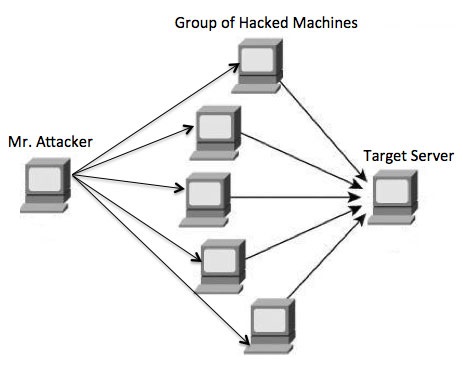
Attackers build a network of hacked machines which are known as botnets, by spreading malicious piece of code through emails, websites, and social media. Once these computers are infected, they can be controlled remotely, without their owners' knowledge, and used like an army to launch an attack against any target.
DDOS System
A DDoS flood can be generated in multiple ways. For example −
  • Botnets can be used for sending more number of connection requests than a server can handle at a time.
  • Attackers can have computers send a victim resource huge amounts of random data to use up the target's bandwidth.
Due to the distributed nature of these machines, they can be used to generate distributed high traffic which may be difficult to handle. It finally results in a complete blockage of a service.

Types of DDoS Attacks

DDoS attacks can be broadly categorized into three categories −
  • Volume-based Attacks
  • Protocol Attacks
  • Application Layer Attacks

Volume-Based Attacks

Volume-based attacks include TCP floods, UDP floods, ICMP floods, and other spoofedpacket floods. These are also called Layer 3 & 4 Attacks. Here, an attacker tries to saturate the bandwidth of the target site. The attack magnitude is measured in Bits per Second (bps).
  • UDP Flood − A UDP flood is used to flood random ports on a remote host with numerous UDP packets, more specifically port number 53. Specialized firewalls can be used to filter out or block malicious UDP packets.
  • ICMP Flood − This is similar to UDP flood and used to flood a remote host with numerous ICMP Echo Requests. This type of attack can consume both outgoing and incoming bandwidth and a high volume of ping requests will result in overall system slowdown.
  • HTTP Flood − The attacker sends HTTP GET and POST requests to a targeted web server in a large volume which cannot be handled by the server and leads to denial of additional connections from legitimate clients.
  • Amplification Attack − The attacker makes a request that generates a large response which includes DNS requests for large TXT records and HTTP GET requests for large files like images, PDFs, or any other data files.

Protocol Attacks

Protocol attacks include SYN floods, Ping of Death, fragmented packet attacks, Smurf DDoS, etc. This type of attack consumes actual server resources and other resources like firewalls and load balancers. The attack magnitude is measured in Packets per Second.
  • DNS Flood − DNS floods are used for attacking both the infrastructure and a DNS application to overwhelm a target system and consume all its available network bandwidth.
  • SYN Flood − The attacker sends TCP connection requests faster than the targeted machine can process them, causing network saturation. Administrators can tweak TCP stacks to mitigate the effect of SYN floods. To reduce the effect of SYN floods, you can reduce the timeout until a stack frees memory allocated to a connection, or selectively dropping incoming connections using a firewall or iptables.
  • Ping of Death − The attacker sends malformed or oversized packets using a simple ping command. IP allows sending 65,535 bytes packets but sending a ping packet larger than 65,535 bytes violates the Internet Protocol and could cause memory overflow on the target system and finally crash the system. To avoid Ping of Death attacks and its variants, many sites block ICMP ping messages altogether at their firewalls.

Application Layer Attacks

Application Layer Attacks include Slowloris, Zero-day DDoS attacks, DDoS attacks that target Apache, Windows or OpenBSD vulnerabilities and more. Here the goal is to crash the web server. The attack magnitude is measured in Requests per Second.
  • Application Attack − This is also called Layer 7 Attack, where the attacker makes excessive log-in, database-lookup, or search requests to overload the application. It is really difficult to detect Layer 7 attacks because they resemble legitimate website traffic.
  • Slowloris − The attacker sends huge number of HTTP headers to a targeted web server, but never completes a request. The targeted server keeps each of these false connections open and eventually overflows the maximum concurrent connection pool, and leads to denial of additional connections from legitimate clients.
  • NTP Amplification − The attacker exploits publically-accessible Network Time Protocol (NTP) servers to overwhelm the targeted server with User Datagram Protocol (UDP) traffic.
  • Zero-day DDoS Attacks − A zero-day vulnerability is a system or application flaw previously unknown to the vendor, and has not been fixed or patched. These are new type of attacks coming into existence day by day, for example, exploiting vulnerabilities for which no patch has yet been released.

How to Fix a DDoS Attack

There are quite a few DDoS protection options which you can apply depending on the type of DDoS attack.
Your DDoS protection starts from identifying and closing all the possible OS and application level vulnerabilities in your system, closing all the possible ports, removing unnecessary access from the system and hiding your server behind a proxy or CDN system.
If you see a low magnitude of the DDoS, then you can find many firewall-based solutions which can help you in filtering out DDoS based traffic. But if you have high volume of DDoS attack like in gigabits or even more, then you should take the help of a DDoS protection service provider that offers a more holistic, proactive and genuine approach.
You must be careful while approaching and selecting a DDoS protection service provider. There are number of service providers who want to take advantage of your situation. If you inform them that you are under DDoS attack, then they will start offering you a variety of services at unreasonably high costs.
We can suggest you a simple and working solution which starts with a search for a good DNS solution provider who is flexible enough to configure A and CNAME records for your website. Second, you will need a good CDN provider that can handle big DDoS traffic and provide you DDoS protection service as a part of their CDN package.
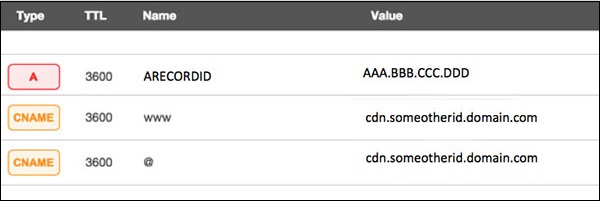
Assume your server IP address is AAA.BBB.CCC.DDD. Then you should do the following DNS configuration −
  • Create a A Record in DNS zone file as shown below with a DNS identifier, for example, ARECORDID and keep it secret from the outside world.
  • Now ask your CDN provider to link the created DNS identifier with a URL, something like cdn.someotherid.domain.com.
  • You will use the CDN URL cdn.someotherid.domain.com to create two CNAME records, the first one to point to www and the second record to point to @ as shown below.
You can take the help from your system administrator to understand these points and configure your DNS and CDN appropriately. Finally, you will have the following configuration at your DNS.
DNS Configuration
Now, let the CDN provider handle all type of DDoS attacks and your system will remain safe. But here the condition is that you should not disclose your system's IP address or A record identifier to anyone; else direct attacks will start again.

Quick Fix

DDoS attacks have become more common than ever before, and unfortunately, there is no quick fix for this problem. However, if your system is under a DDoS attack, then don’t panic and start looking into the matter step by step.

Ethical Hacking - TCP/IP Hijacking

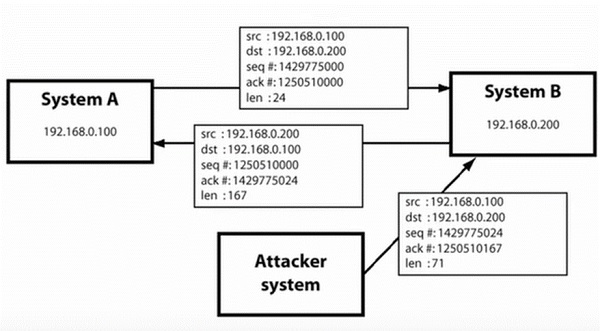
TCP/IP Hijacking is when an authorized user gains access to a genuine network connection of another user. It is done in order to bypass the password authentication which is normally the start of a session.
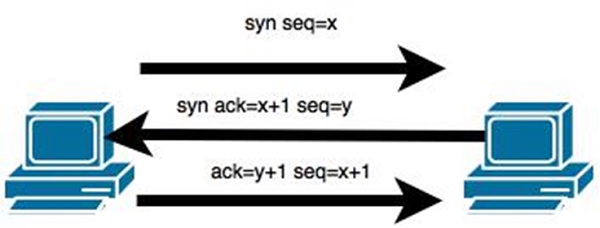
In theory, a TCP/IP connection is established as shown below −
TCP/IP
To hijack this connection, there are two possibilities −
  • Find the seq which is a number that increases by 1, but there is no chance to predict it.
  • The second possibility is to use the Man-in-the-Middle attack which, in simple words, is a type of network sniffing. For sniffing, we use tools like Wireshark or Ethercap.

Example

An attacker monitors the data transmission over a network and discovers the IP’s of two devices that participate in a connection.
When the hacker discovers the IP of one of the users, he can put down the connection of the other user by DoS attack and then resume communication by spoofing the IP of the disconnected user.

Shijack

In practice, one of the best TCP/IP hijack tools is Shijack. It is developed using Python language and you can download it from the following link − https://packetstormsecurity.com/sniffers/shijack.tgz
Here is an example of a Shijack command −
root:/home/root/hijack# ./shijack eth0 192.168.0.100 53517 192.168.0.200 23
Shijack
Here, we are trying to hijack a Telnet connection between the two hosts.

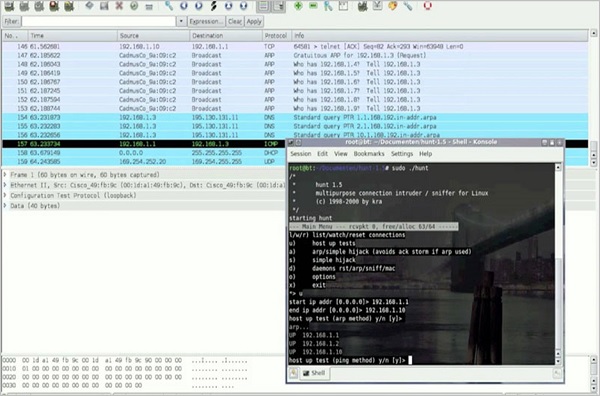
Hunt

Hunt is another popular tool that you can use to hijack a TCP/IP connection. It can be downloaded from − https://packetstormsecurity.com/sniffers/hunt/
Hunt

Quick Tip

All unencrypted sessions are vulnerable to TCP/IP session hijacking, so you should be using encrypted protocols as much as possible. Or, you should use double authentication techniques to keep the session secured.